Where do your saved posts actually go?
Saved a tweet, a Reddit thread, a TikTok video, and can't find it now? Here's where every platform hides your saves, why they vanish, and how to keep them for good.
You've saved hundreds of things. A tweet with the perfect comeback. A Reddit thread that finally explained the tax thing. A TikTok recipe you swore you'd make. Then you go looking for one, and it's gone. Buried in an app you can't search, or deleted by someone you'll never meet.
The problem isn't you. It's that every platform hides your saves somewhere different, none make them genuinely searchable, and some quietly delete themselves. Here's exactly where each one lives, why you keep losing them, and how to keep every save in one place for good.
The quick answer: where each app keeps your saves
If you just need to find them right now:
- X (Twitter): On desktop, click Bookmarks in the left sidebar; on mobile, open your profile menu and choose Bookmarks (now grouped under History on updated apps). They're private to you, but good luck searching them: X's own bookmark search only matches keywords, only inside X, and only on web and iOS.
- Reddit: Go to your avatar → Saved (or go to
reddit.com/user/me/saved). Both posts and comments land in the same list, with no full-text search. - Instagram: Open your profile, tap the menu (☰), then Saved, optionally split into Collections. You can't search by caption or by who posted it.
- TikTok: On your profile, open the Favorites tab (the little bookmark, not Likes). Videos only, no captions to scan, no search.
Notice the pattern: four apps, four different hiding places, and not one of them lets you search by what the post was about, which is usually the only thing you actually remember.
Why you can never find the one you want
You don't remember the username or the exact wording. You remember the gist: "that espresso thread," "the budgeting video," "the layout I liked." But the saved lists above index almost nothing:
- There's no real search. Most in-app saved screens don't search the text of the post at all. You're left scrolling a reverse-chronological wall hoping to recognize a thumbnail.
- They're scattered across silos. One save is in X, the next in Reddit, the next in Instagram. There's no single place that holds all of them, so even a thorough search means checking one app after another.
- Order works against you. Everything is sorted by when you saved it, never by topic, so the recipe you saved last March is a thousand scrolls deep, wedged between a meme and a news clip.
Why your saves quietly disappear
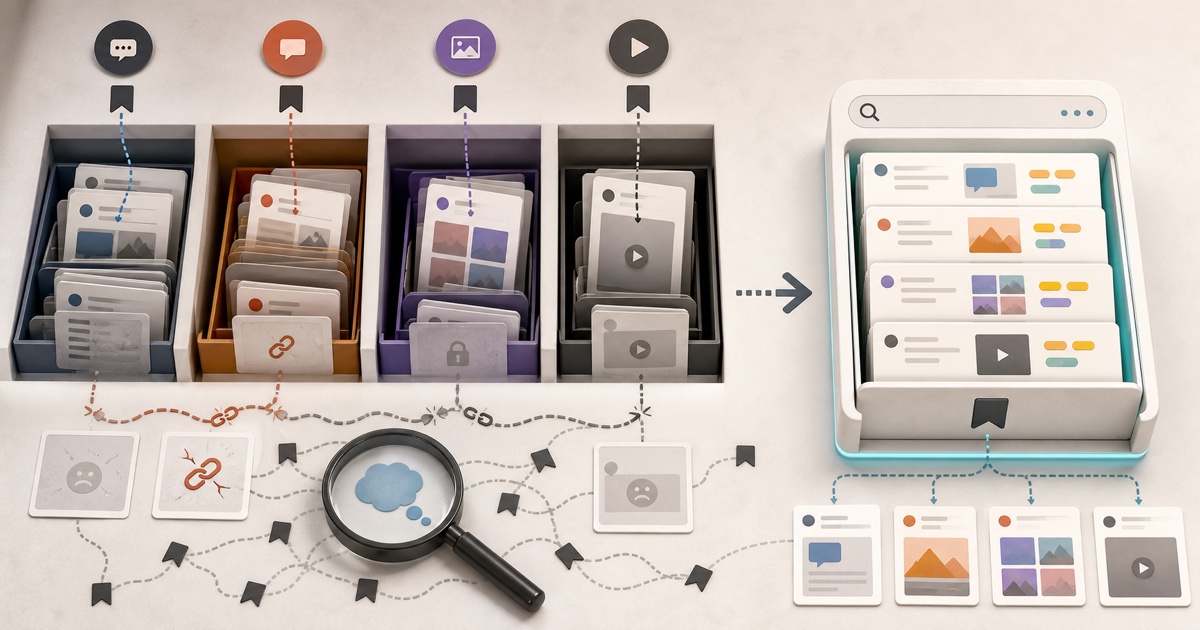
Even when you do find the right entry, it can resolve to nothing. That's because a platform's saved list doesn't store the post: it stores a pointer to a post that still lives on the platform's servers.
A bookmark is only as alive as the original
The moment the author deletes the post, sets the account to private, gets suspended, or the link simply rots, your saved reference points at a 404. The save looks intact in your list right up until you tap it.
It happens more than you'd think. Creators delete and repost constantly. Accounts get banned and go private. And Instagram is sneakier still: its media URLs are signed to expire within hours, so if you try to keep a post by saving its link, that copy dies on a timer even while the original is still up. Your "saved forever" turns out to have an expiry date you never agreed to.
Saved posts across platforms, side by side
| Platform | Where saves live | Search by topic? | Survives a delete? |
|---|---|---|---|
| X / Twitter | Profile menu → Bookmarks | No | No |
| Avatar → Saved | No | No | |
| Profile → Saved (Collections) | No | No | |
| TikTok | Profile → Favorites | No | No |
| Stashr | One library, every platform | Yes | Yes |
The first four rows are the status quo: findable only by scrolling, gone the moment the original is. The last row is the fix.
How to actually keep everything you save
The reason native saves rot is that they were never copies in the first place. So the answer is to capture the content, not just a link, the instant you save it.
That's what Stashr does. Its browser extension watches for saves on the platforms you already use and, the moment you tap save, mirrors the full post (text, author, media, and context) into a private library of your own. Because it's a real copy:
- It survives deletion. The original can vanish; your copy stays put.
- It's all in one place. X, Reddit, Instagram, TikTok, and more all land in the same library instead of a pile of separate silos.
- You can search it the way you think. Every save is AI-tagged on the way in, so plain-English search actually works:
stashr.search("that espresso thread from reddit");
// → returns the post, even if the original was later deleted
Already sitting on a pile of bookmarks?
You don't need Stashr to start digging out. Our free tools can convert a Reddit thread to Markdown, turn a tweet into clean text, or untangle a messy browser bookmarks file. No signup required.
Common questions
Are my saved posts private?
On every major platform, yes: your bookmarks, saved posts, and favorites are visible only to you. That privacy is also why no one else can help you find them, and why there's no shared search to fall back on.
Can other people see what I've saved?
No. Saved lists aren't published or shared with followers. The trade-off is that they're also invisible to any tool that could make them searchable, unless you bring your own.
Do my saves disappear if I lose access to the platform?
If your account is suspended or you delete it, your in-app saved lists go with it. That's the strongest argument for keeping an independent copy: your library shouldn't depend on staying in any single platform's good graces.
How do I back up my saved posts?
You can export some lists manually, platform by platform, but it's tedious and most exports are just links, which rot. A capture-first tool like Stashr backs up the actual content automatically as you save, so there's nothing to remember to export.
Stop losing the things you save.
Stashr captures every save across every platform the moment you tap it. Full content, auto-tagged, findable in plain English.
7-day free trial · No credit card required · Cancel anytime