Stashr is now in public beta
Stashr is now in public beta: sign up free, install the extension, and start keeping every save. Here's what's live today, what the beta gets you, and what's next.

The waitlist is gone. Stashr is open to everyone, and it is free to use for the whole public beta. If you save a lot online and keep losing it, you can start keeping every save today.
What "public beta" means for you
Until now, Stashr was invite-only behind a waitlist. That's over. Anyone can create an account right now, and the whole app is free to use for as long as the beta runs. No credit card, no trial countdown ticking in the corner: your access simply doesn't expire while we're in beta.
It's a beta because a few of the biggest pieces (an AI agent and an MCP server, more on those below) are still in progress, and because opening the doors wider is the fastest way to find the rough edges. Everything described in this post as "live today" is real and working right now. If something breaks, you're helping us find it, and there's a real person reading the reports.
What Stashr actually is
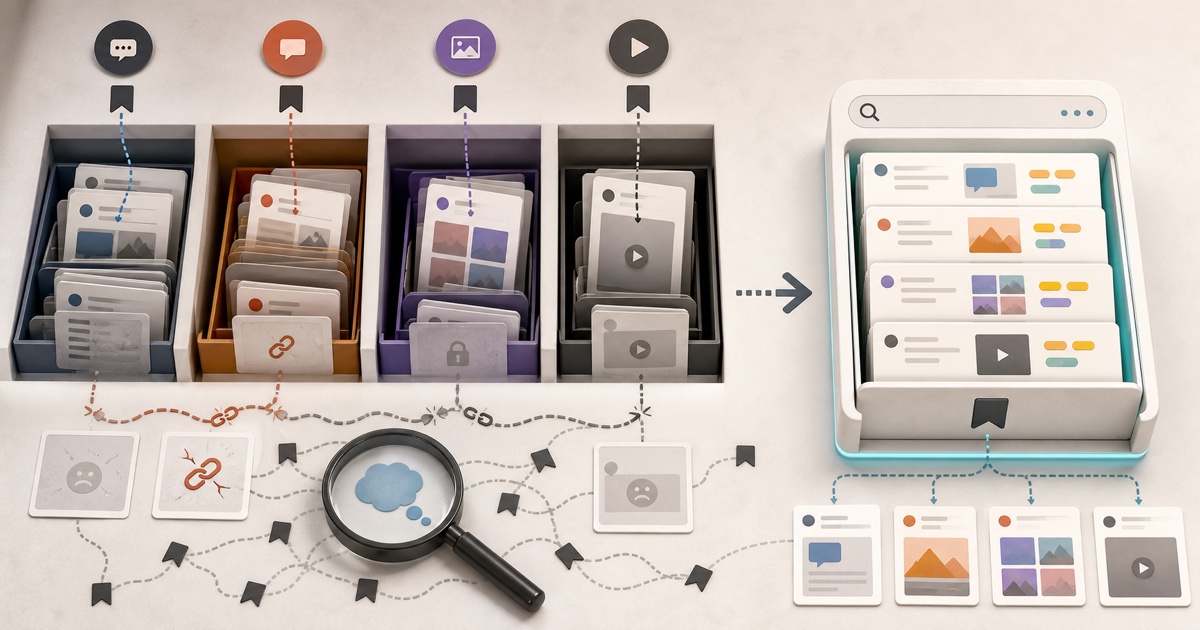
In one line: it's a capture-first bookmark manager. The moment you save something on any platform, Stashr copies the full post into a private library that's genuinely yours, then auto-tags it and makes it searchable in plain English.
That "copy" part is the whole point. A normal bookmark is just a pointer at someone else's servers. The day the author deletes the post, goes private, or gets suspended, your save resolves to nothing. Stashr keeps a real copy, so what you saved is still there months later even when the original is gone. If you've ever wondered where your saved posts actually go or watched your links quietly rot into 404s, that's the gap this closes.
It works in three moves:
Capture
A browser extension watches for saves on the platforms you already use. Bookmark on X, favorite on TikTok, save on Reddit, tap the ribbon on Instagram, exactly as you always have, and the full post lands in Stashr automatically. You don't change a single habit. There's also a bulk import, so the backlog you already built comes along too.
Organize
Every save is read and auto-tagged by AI on the way in, so the filing happens for you. No folders to babysit, no tagging discipline to keep up. Collections, folders, and filters are there when you want them, but the library stays organized on its own.
Recall
Then you search by meaning, not just keywords. Ask for the gist the way you'd ask a friend who remembered it for you ("that espresso thread from Reddit"), and the right save comes back even if it never used those exact words. On the higher tier, that meaning-based search reaches inside your images and video too, not just the text.
What's live today
Everything here works right now, in the beta:
- Capture from X, Reddit, Instagram, and TikTok, plus saving any image or text snippet from the wider web.
- Full-post copies of everything you save, so it survives the original being deleted.
- AI auto-tagging on every save, and search by meaning across your text (and, on Pro, across your images and video too).
- Bulk import of the bookmarks you already have, so you're not starting from zero.
- A private library you can export any time. It's yours, and you can leave with it whenever you want.
You can start cleaning up without an account
Not ready to sign up yet? Our free tools work with no account at all. Untangle a messy browser bookmarks file, find the duplicates, turn a Reddit thread into clean Markdown, or check a pile of links for dead ones.
What's coming next
A few of the biggest pieces are still in the oven, and they're the reason this is a beta and not a 1.0:
- An AI agent that finds anything for you. Instead of searching, you ask, and it goes and pulls the right saves out of your library.
- An MCP server for Claude and other AI tools. This is the one I'm most excited about: your years of saved reading become context your AI can reach into directly, so the thing you bookmarked in 2024 can show up in an answer today.
- A Firefox extension and more platforms. The Chrome extension is live now; Firefox is on the way, and more capture sources are coming after that.
When I say soon, I mean it
The capture, organizing, and plain-English search above are live and working today. The agent and MCP pieces are in progress, and I'd rather ship them right than ship them half-working. I'll write about each here when it lands.
What it costs
Nothing, for the whole beta. Sign up with no card and use everything free while the public beta is on.
After the beta, Stashr will move to paid plans with a 7-day free trial and no permanent free tier (we think an app whose entire job is to permanently keep your stuff shouldn't be quietly mining it instead). We're still finalizing the exact plans, but the shape is a lower Hobby tier for unlimited capture plus meaning-based text search, and a Pro tier that adds the AI auto-tagging, image and video search, and the agent. You can see the current thinking on the pricing page. Either way, joining the beta now means you get all of it free in the meantime.
How to get in
- Create your free account. No card, no waitlist.
- Install the browser extension from the Chrome Web Store.
- Start saving the way you already do, and run a bulk import to pull in your backlog.
That's it. The pile you've been quietly losing across six apps starts landing in one searchable place from the first save.
Please break it
Here's the real ask: don't be gentle. A beta is only worth running if people actually push on it, so use Stashr like you mean it. Throw your whole backlog at the bulk import. Save the weird stuff, the giant threads, the deleted posts, the edge cases. Try to make the search miss. Try to make capture drop something. Find the bug, and let me fix it before the next person hits it.
The more you use it and the harder you push, the better it gets, for you and for everyone who signs up after you. If something breaks, feels off, or is just missing, I want to hear it. Tell me what's clunky, what you wish it did, what almost made you close the tab.
Tell me what's broken (or missing)
Email support@stashr.me with anything at all: bugs, confusing bits, feature requests, or a save that didn't capture right. It goes straight to me, a real person reads every one, and beta feedback is what decides what I build next.
I built Stashr because I was tired of carefully saving things I'd never actually see again. If that's you too, this is the easiest it will ever be to start. You can read the longer story of why I built it if you want the full backstory.
Keep everything you save, for good.
Stashr is in public beta and free to use. Capture every save across every platform the moment you tap it, full content, auto-tagged, and searchable in plain English.
14-day free trial · No credit card required · Cancel anytime